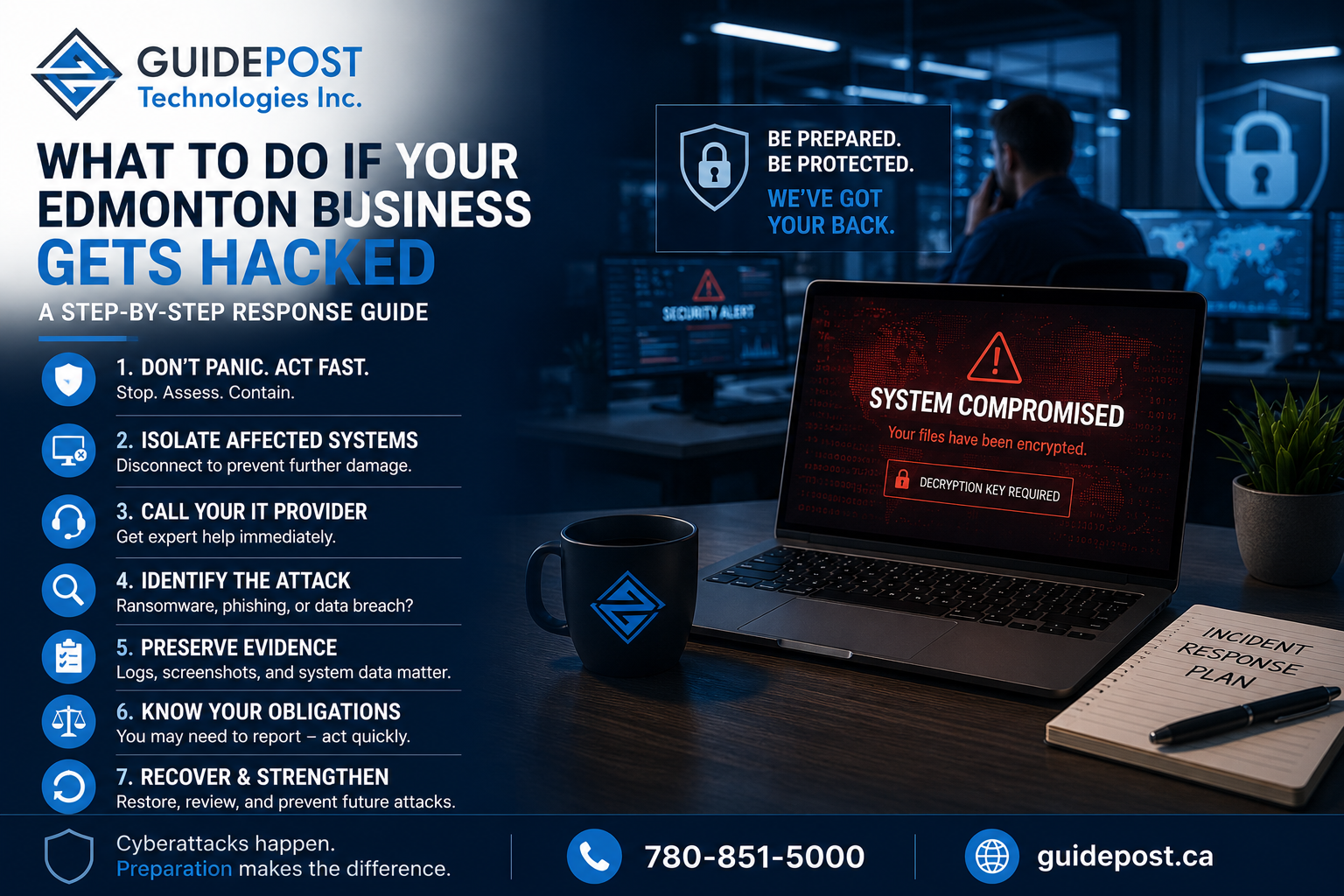
Most Edmonton business owners have a vague plan for what they’d do if their business got hacked. Call IT. Change passwords. Hope for the best.
That’s not a plan. And when your business actually gets hacked — which for most Alberta SMBs is a matter of when, not if — the decisions you make in the first few hours determine whether you recover quickly or spend weeks dealing with the consequences.
This guide gives Edmonton businesses a clear, actionable response plan for the most common cyberattack scenarios. Save it somewhere accessible. The worst time to figure out your response plan is after something has already gone wrong.
Step 1: Don’t Panic — But Act Immediately
The first instinct when something goes wrong is often to start clicking around, restarting systems, or trying to fix things without a clear understanding of what happened. This is one of the most damaging things you can do.
Restarting infected systems can destroy forensic evidence needed to understand the attack. Clicking around on a compromised network can trigger dormant malware. Attempting to remove ransomware without expert guidance can make recovery harder or impossible.
Instead, do this immediately:
Stop. Assess. Contain.
Before anything else, identify what you’re dealing with and isolate the problem before it spreads further.
Step 2: Isolate Affected Systems
The moment you suspect a breach or attack, disconnect affected systems from the network. This means:
- Unplugging the ethernet cable from affected computers
- Disconnecting affected devices from WiFi
- Not shutting the device down — leave it powered on for forensic analysis
- Not logging into the device from another system
Isolation prevents the attack from spreading to other systems on your network. Ransomware in particular spreads aggressively across connected networks — the faster you isolate, the less damage it causes.
If you’re not sure which systems are affected, isolate everything that shows unusual behaviour and call your IT provider immediately.
Step 3: Call Your IT Provider
This is not the time to troubleshoot alone. Call your managed IT provider or IT support company immediately — even if it’s outside business hours. If you don’t have a managed IT provider, this is the moment you’ll feel that gap most acutely.
When you call, tell them:
- What you noticed and when
- Which systems appear affected
- What actions have been taken so far (if any)
- Whether you have backups and when they were last tested
A competent IT provider will begin incident response immediately — assessing the scope of the attack, containing the spread, and starting the recovery process. As we covered in our data backup and recovery guide, having tested backups in place is the single most important factor in how quickly your business recovers from a ransomware attack or data loss incident.
Step 4: Identify What Type of Attack You’re Dealing With
Different attacks require different responses. The most common scenarios Edmonton businesses face:
Ransomware
Your files are encrypted and you’re seeing a ransom demand. Do not pay immediately — and ideally, do not pay at all without expert guidance. Your IT provider needs to assess whether your backups are intact and unaffected before you make any decisions about payment. Many businesses pay ransoms only to discover their backups were also compromised, or that decryption keys provided don’t actually work.
We covered ransomware prevention in detail in our ransomware protection guide. The response is straightforward: isolate, assess backups, engage IT provider, and make payment decisions only with full information.
Compromised Email Account
An employee’s email account has been accessed by an attacker. This is the most common attack on Alberta SMBs and often goes unnoticed for days or weeks. Signs include emails sent that the employee didn’t write, password change notifications, unfamiliar login locations in the account activity log, or clients reporting suspicious emails from a staff address.
Immediately reset the password for the affected account, revoke all active sessions (this is done through the Microsoft 365 admin centre), and enable MFA if it wasn’t already active. Then review the account’s email rules — attackers frequently create forwarding rules to send copies of incoming email to an external address.
Phishing Attack — Employee Clicked a Link
An employee has clicked a suspicious link or entered credentials on what turned out to be a fake login page. As we covered in our phishing attacks guide, the damage depends entirely on how quickly you respond.
Immediately change the password for any account the employee may have entered credentials for. Check whether the account shows any suspicious login activity in Microsoft 365. Isolate the device the employee was using and have it assessed for malware before reconnecting it to the network.
Data Breach — Unauthorized Access to Client or Business Data
An attacker has accessed systems containing personal or business information. This triggers specific legal obligations under Alberta’s privacy legislation — more on that in Step 6.
Step 5: Preserve Evidence
Before cleaning up or restoring systems, preserve as much evidence as possible. Your IT provider should handle this, but it’s worth understanding why it matters.
Evidence preservation includes:
- Screenshots of ransom notes or error messages
- Logs from affected systems showing what happened and when
- Network traffic logs from your firewall
- The affected devices themselves, powered on and isolated
This evidence is needed for insurance claims, law enforcement reporting, and forensic analysis to understand how the attack happened so you can prevent recurrence.
Step 6: Understand Your Legal Obligations
A cyberattack on your Edmonton business may trigger mandatory reporting obligations you need to be aware of immediately — not days later.
Under Alberta’s Personal Information Protection Act (PIPA), if the breach involves personal information and creates a real risk of significant harm to affected individuals, you must notify those individuals and report to the Office of the Information and Privacy Commissioner of Alberta. The threshold for “real risk of significant harm” is lower than most business owners expect.
Under federal PIPEDA, if your business is federally regulated or operates across provincial lines, similar breach notification obligations apply.
Under your cyber insurance policy, most cyber insurance policies require you to notify your insurer within 24 to 72 hours of discovering an incident. Failing to notify promptly can jeopardize your claim. Contact your insurer at the same time you contact your IT provider.
Step 7: Communicate — But Carefully
At some point you need to communicate about the incident — with affected employees, with clients, and potentially with the public. How you communicate matters significantly for both legal and reputational reasons.
Internally: Tell affected employees what happened, what they should and shouldn’t do, and what the current status is. Don’t speculate about causes or scope until you have clear information.
With clients: If client data was involved, you have legal obligations to notify affected individuals. Work with legal counsel on the specific wording of breach notifications — an improperly worded notification can create additional liability.
Publicly: Don’t say more than necessary and don’t say anything publicly before your legal obligations are clear. A brief, factual statement is better than speculation.
With law enforcement: Significant ransomware attacks and data breaches should be reported to the RCMP’s National Cybercrime Coordination Centre (NC3) and to the Canadian Centre for Cyber Security. Reporting doesn’t obligate you to pursue charges, but it contributes to threat intelligence that helps protect other businesses.
Step 8: Recover and Restore
Once the attack is contained and evidence is preserved, recovery begins. The path depends on what happened:
Ransomware recovery: If backups are intact and unaffected, restore from the most recent clean backup. This is why tested, isolated backups are non-negotiable — a backup stored on the same network as the infected systems is often compromised alongside them. Our data backup guide covers what a proper backup strategy looks like.
Account compromise recovery: Once the compromised account is secured and suspicious rules removed, review email sent during the compromise period for any fraudulent communications sent on the business’s behalf.
Full system rebuild: In severe cases, affected systems may need to be rebuilt from scratch rather than restored. This is slower but eliminates any risk of persistent malware surviving a restoration.
Step 9: Learn and Prevent Recurrence
Once you’re back to normal operations, conduct a post-incident review. This means understanding:
- How the attacker gained access
- What security controls failed or were absent
- What would have reduced the impact if properly in place
- What needs to change before the same attack can happen again
Common gaps discovered after incidents include the absence of MFA, untested backups that couldn’t be used for recovery, no network segmentation allowing rapid spread, and missing endpoint protection on remote devices.
Have a Plan Before You Need One
The businesses that recover fastest from cyberattacks are the ones that had a plan before the attack happened — not the ones scrambling to figure out what to do under pressure.
A basic incident response plan for an Edmonton SMB includes:
- Contact information for your IT provider (including after-hours emergency contact)
- Contact information for your cyber insurer
- A list of which systems are most critical to restore first
- Documented backup locations and restoration procedures
- Legal counsel contact for breach notification guidance
This doesn’t need to be a 40-page document. A single page with the right contacts and the right order of operations is enough to prevent the worst decisions that happen in the first panicked hour of an incident.
Frequently Asked Questions
What should I do first if my business gets hacked? Isolate affected systems by disconnecting them from the network, then call your IT provider immediately. Don’t restart systems, don’t try to remove malware yourself, and don’t pay any ransom before getting expert advice on whether your backups are recoverable.
Should I pay the ransom if my files are encrypted? Not immediately, and ideally not without expert guidance. Your IT provider needs to assess whether your backups are intact and whether payment is actually necessary. Many ransoms are paid unnecessarily by businesses that had recoverable backups they weren’t aware of.
How do I know if my Edmonton business has been hacked? Common signs include: files you can’t open or that have strange extensions, ransom notes appearing on screens, employees locked out of accounts, unusual login alerts from Microsoft 365, clients reporting strange emails from your domain, or systems running unusually slowly. Any of these warrants immediate investigation.
Do I have to report a data breach in Alberta? If the breach involves personal information and creates a real risk of significant harm, yes — you must notify affected individuals and report to the Office of the Information and Privacy Commissioner of Alberta under PIPA. Contact legal counsel immediately to assess your specific obligations.
How long does it take to recover from a ransomware attack? With tested, isolated backups, recovery can happen within hours to days. Without proper backups, recovery can take weeks or may be impossible for some data. This is why tested backups are the single most important factor in incident recovery time.
GuidePost Can Help
GuidePost Technologies provides incident response support, proactive security monitoring, and the managed IT services that prevent most attacks from succeeding in the first place — for Edmonton and Sherwood Park businesses.
If your business is currently experiencing a security incident, call us immediately at 780-851-5000.
For businesses that want to be prepared before something happens, we offer free IT and security assessments that identify gaps before they become incidents.
Explore our Cybersecurity Services →
GuidePost Technologies — Managed IT Services, Cybersecurity, Cloud Computing, and Network Support for Edmonton and Alberta Businesses.
3 Reply on “What to Do If Your Edmonton Business Gets Hacked: A Step-by-Step Response Guide”