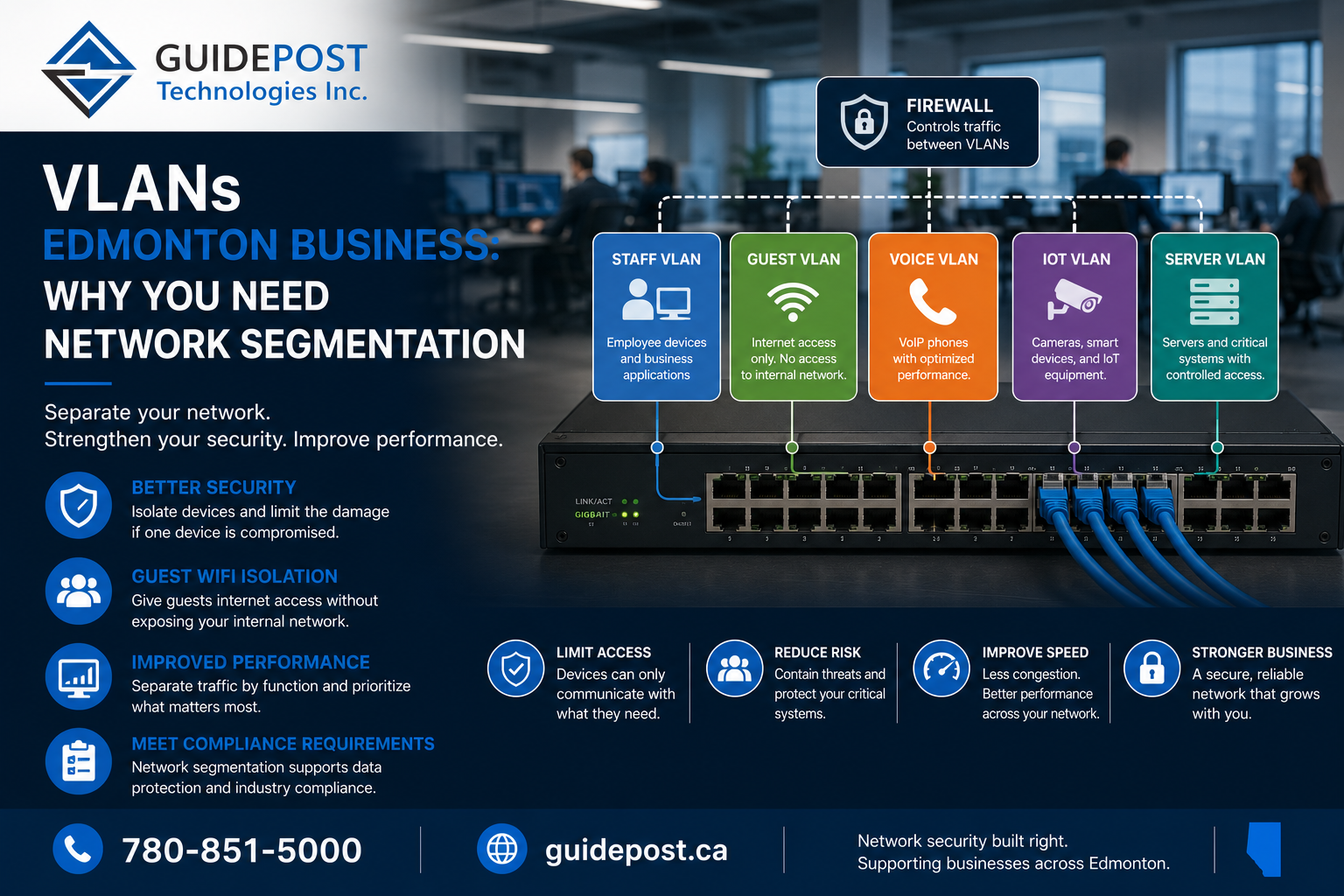
VLANs for Edmonton business networks are one of the most overlooked pieces of infrastructure — often skipped when a network is first set up and never revisited as the business grows. If every device on your network — staff laptops, guest WiFi, security cameras, printers, and your point-of-sale system — is sitting on the same flat network, you have a security and performance problem you probably don’t know about yet.
This post explains what VLANs actually are, why they matter for security and performance, and how Edmonton businesses should think about implementing them properly.
What VLANs Mean for Edmonton Business Networks
A VLAN (Virtual Local Area Network) is a way of logically segmenting a single physical network into multiple separate, isolated networks. Devices on different VLANs cannot communicate with each other directly unless specifically configured to do so, even though they may be plugged into the same physical switch or sharing the same WiFi access point.
Think of it as building internal walls within your network. Without VLANs, every device that connects to your network — wired or wireless — exists on the same flat network and can potentially see and interact with every other device. With VLANs for Edmonton business networks properly configured, you control exactly what can talk to what.
For Edmonton businesses with network installations that have grown organically over time — adding devices, WiFi networks, and systems without revisiting the underlying network design — VLANs are often the single most impactful upgrade available.
Why Edmonton Businesses Need Network Segmentation
Security: Limiting the Blast Radius
This is the most important reason to implement VLANs for Edmonton business networks. If an attacker compromises one device on a flat network — say, through a phishing attack that gives them access to an employee’s laptop — they can potentially see and attack every other device on that same network. Servers, other workstations, security cameras, point-of-sale systems — all become reachable from that single compromised device.
With proper VLAN segmentation, a compromised device on the guest network or the IoT VLAN simply cannot reach your servers or staff workstations. The attacker’s access is contained to whatever VLAN that device sits on. Cisco’s guide to network segmentation outlines the same principles at an enterprise level — the goal is always containment. This containment is exactly what limits the damage from the kind of credential theft and ransomware spread we covered in our ransomware protection guide.
Guest WiFi Isolation
Every business that offers WiFi to visitors, clients, or contractors needs that traffic completely isolated from internal systems. Without VLANs, a guest connecting to your WiFi could potentially access internal file shares, printers, or worse. A properly configured guest VLAN allows internet access for visitors while blocking any access to your internal network entirely.
IoT and Smart Device Isolation
Security cameras, smart thermostats, door access systems, and other IoT devices are notoriously insecure — manufacturers frequently fail to provide timely security updates, and many devices ship with default credentials that never get changed. Placing these devices on their own isolated VLAN means that even if one is compromised, it cannot be used as a stepping stone into your primary business network.
Performance and Network Traffic Management
VLANs also help manage network performance by separating traffic types. Voice traffic for VoIP phone systems performs best with dedicated bandwidth and minimal congestion — placing voice traffic on its own VLAN with appropriate quality of service (QoS) settings ensures call quality isn’t degraded by file transfers or video streaming happening elsewhere on the network.
Similarly, separating departments or functions — finance, operations, guest access — onto different VLANs prevents heavy network usage in one area from impacting performance elsewhere.
Compliance Requirements
Businesses handling sensitive data — healthcare under the Health Information Act, financial information, or personal information under Alberta’s PIPA — often have compliance obligations that effectively require network segmentation. Keeping systems that handle sensitive data isolated from general business traffic is both a security best practice and, increasingly, a documented requirement for compliance and cyber insurance purposes.
VLANs Edmonton Business Networks Should Use
A typical, well-designed VLAN structure for an Edmonton small or medium business includes:
Management VLAN — Used exclusively for managing network infrastructure itself (switches, routers, access points). This should never be accessible from general user devices.
Staff/Corporate VLAN — Where staff workstations and laptops connect, with access to internal file shares, printers, and business applications.
Guest VLAN — Completely isolated internet-only access for visitors, with no path to internal systems.
VoIP VLAN — Dedicated to phone system traffic, configured with appropriate QoS to ensure consistent call quality, particularly relevant for businesses using Teams Phone or traditional VoIP systems.
IoT/Security VLAN — Isolated network for cameras, access control systems, and other smart devices that don’t need to interact with staff systems.
Server VLAN — Where servers and critical infrastructure live, with tightly controlled access from other VLANs based on actual business need.
The exact structure depends on your business’s specific needs, but the underlying principle is the same: group devices by function and trust level, and control what can communicate between groups.
How VLANs Work with Firewalls
VLANs alone create the segments, but a properly configured firewall is what actually enforces the rules about what can communicate between them. This is where many DIY or poorly planned network setups fall short — VLANs are created, but the firewall rules between them are either too permissive (defeating the purpose of segmentation) or so restrictive that legitimate business functions break.
Getting this balance right requires understanding what actually needs to communicate across VLAN boundaries — for example, staff workstations need to reach the server VLAN for file access, but the guest VLAN should have zero access to anything except the internet. Properly configuring these inter-VLAN rules is a meaningful part of a quality network installation, not an afterthought.
Signs Your Edmonton Business Needs VLAN Implementation
- Your guest WiFi and staff WiFi are on the same network, or guest WiFi doesn’t exist as a separate network at all
- Security cameras or smart devices are plugged into the same switches as staff workstations
- You’ve never had a conversation with your IT provider about network segmentation
- Your business handles sensitive client, health, or financial data without documented network isolation
- You’re using VoIP or Teams Phone and experiencing call quality issues
- Your network has grown significantly since it was first set up, with devices added without revisiting the overall design
If any of these apply, a network assessment focused on segmentation is worth pursuing.
Frequently Asked Questions
How do I set up office network segmentation? Proper VLAN implementation requires managed switches and access points that support VLAN tagging, a firewall capable of enforcing rules between VLANs, and a clear plan for which devices belong on which segment. This is typically done as part of a broader network design and installation project, not a simple configuration change.
Will VLANs slow down our network? No — properly configured VLANs typically improve performance by reducing unnecessary broadcast traffic and allowing prioritization of critical traffic like voice calls. Performance issues come from poor configuration, not from segmentation itself.
Do small businesses really need VLANs, or is this just for larger companies? Any business with more than a handful of devices benefits from basic segmentation — at minimum separating guest WiFi from internal systems. The complexity of your VLAN structure should scale with your business size and risk profile.
How does network segmentation help with cybersecurity? It limits how far an attacker can move after compromising a single device — preventing a phishing attack on one employee’s laptop from giving an attacker access to your servers, point-of-sale systems, or other sensitive infrastructure.
Can I add VLANs to my existing network without replacing everything? In many cases, yes — if your existing switches and access points support VLAN tagging (most business-grade equipment from the last several years does), segmentation can often be implemented through configuration changes rather than a full hardware replacement.
GuidePost Can Help
GuidePost Technologies designs and implements VLANs for Edmonton business networks — including segmentation architecture, firewall configuration, and guest network isolation as part of our network installation services.
Explore our Network Installation Services →
Call us at 780-851-5000 to book a free network security assessment for your business.
GuidePost Technologies — Managed IT Services, Cybersecurity, Cloud Computing, and Network Support for Edmonton and Alberta Businesses.
2 Reply on “VLANs for Edmonton Businesses: Why Your Network Needs Segmentation in 2026”