Phishing attacks on Alberta SMBs are the number one way cybercriminals get into business networks — and in 2026 they’ve gotten significantly harder to spot. It just takes one employee clicking the wrong link at the wrong moment. This guide breaks down exactly what phishing attacks targeting Alberta small businesses look like right now, what the warning signs are, and what you can do to protect your business before it’s too late.
How Phishing Attacks Hit Alberta SMBs in 2026
Phishing attacks on Alberta SMBs have increased by over 60% compared to two years ago. The attacks have evolved well beyond the obvious spam emails most people recognize. Here’s what’s actually hitting businesses in Edmonton, Sherwood Park, and across Alberta right now:
Fake Microsoft 365 Login Pages
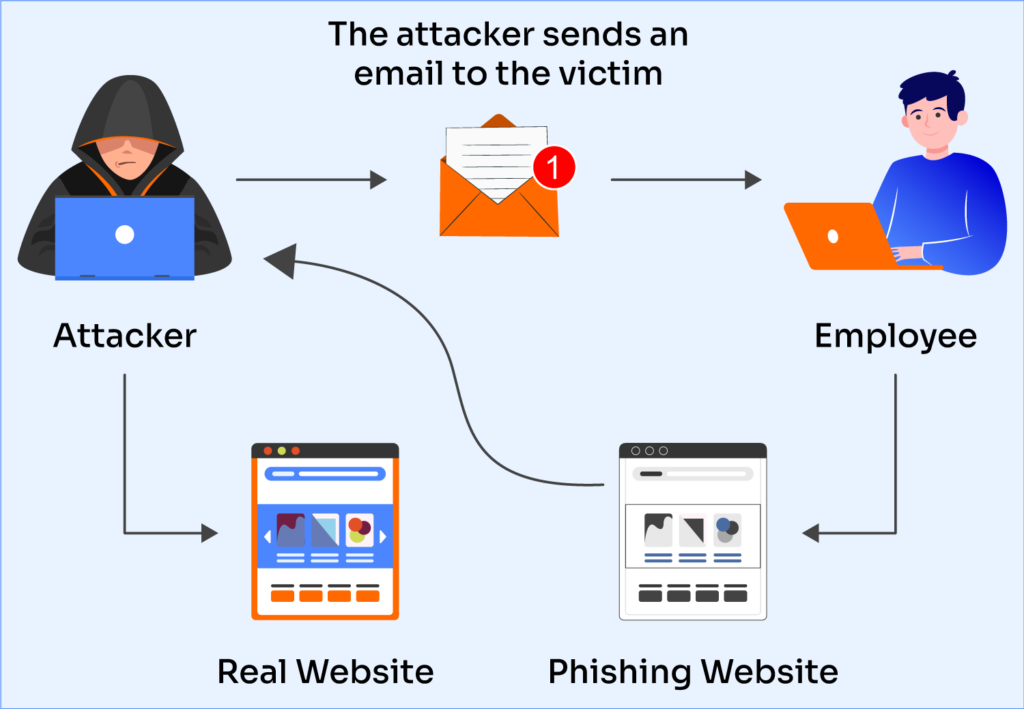
The most common attack hitting Canadian SMBs right now. An employee receives an email saying their password is expiring or their account needs verification. The link takes them to a page that looks exactly like the Microsoft login screen. They enter their credentials. The attacker now has full access to their Microsoft 365 account — email, SharePoint, Teams, OneDrive, everything. Microsoft has published guidance on recognizing these attacks that every business owner should review.
Supplier and Vendor Impersonation
Attackers research your business, identify your suppliers, and send emails pretending to be from those suppliers with updated banking information. One approved payment and the money is gone.
CEO and Executive Fraud
An employee in accounting receives an urgent email appearing to come from the owner or CEO asking for an immediate wire transfer. The urgency and authority create pressure to act without verifying. This attack alone costs Canadian businesses tens of millions of dollars every year.
QR Code Phishing
Instead of a suspicious link, the email contains a QR code. The recipient scans it with their phone, bypassing most corporate email security filters entirely.
Teams and Slack Phishing
Fake Teams messages from what appears to be IT support asking employees to install an update or verify their account are becoming increasingly common as businesses move to collaboration platforms.
Why Alberta Businesses Are Targeted
Phishing attacks on Alberta SMBs are particularly common for a few reasons. High-value industries like oil and gas, construction, legal, and healthcare handle large transactions and sensitive data — making a successful attack highly profitable for attackers. Remote and hybrid workforces make it harder to verify unusual requests in person. And many Alberta business owners still believe they’re too small to be targeted, which is exactly the kind of thinking attackers count on.
First Nations and Indigenous organizations in Alberta are also increasingly targeted due to the significant funding, government contracts, and community data they handle. Proper cybersecurity training and email protection are essential for these organizations.
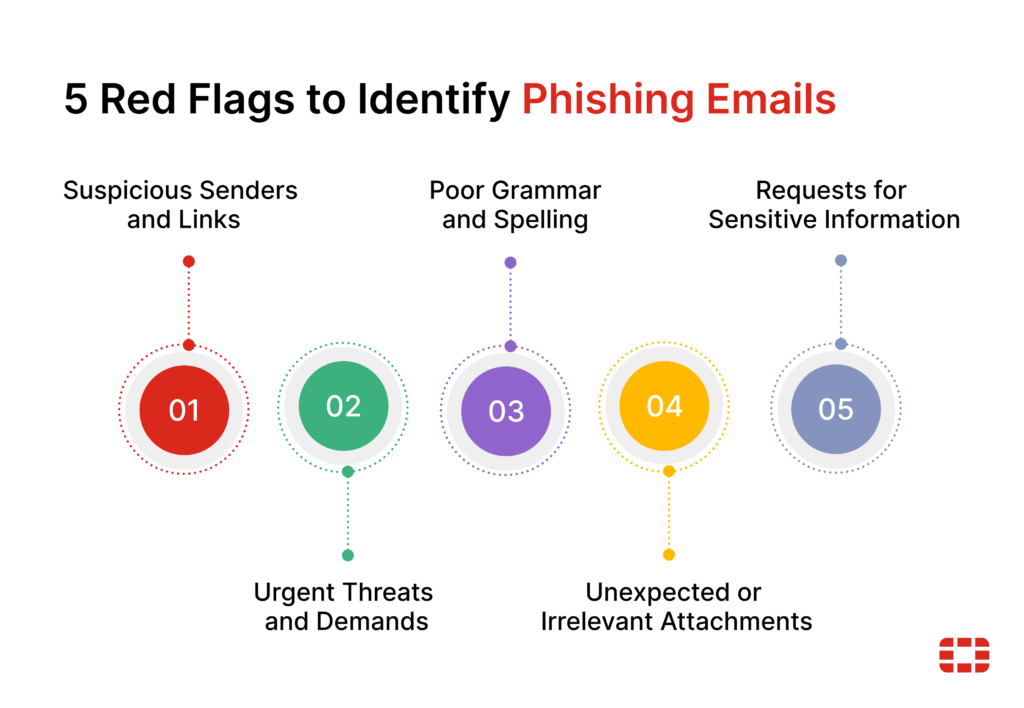
5 Signs of a Phishing Email
Train your team to watch for these:
1. Urgency or pressure — “Act immediately,” “Your account will be suspended.” Legitimate organizations don’t pressure you to act within minutes.
2. Mismatched sender address — The display name says “Microsoft Support” but the actual email address is something generic or suspicious. Always check the actual address.
3. Generic greeting — “Dear Customer” instead of your actual name. Legitimate organizations you have accounts with know your name.
4. Suspicious links — Hover over any link before clicking. If the URL doesn’t match the organization it claims to be from, don’t click it.
5. Unexpected attachments — Any unexpected attachment, especially .zip, .exe, or .pdf files from unknown senders, should be treated with extreme caution.
How to Protect Your Alberta SMB from Phishing Attacks
Awareness alone isn’t enough. Here’s what proper phishing protection looks like for Alberta SMBs:
Email filtering and anti-spoofing — Microsoft 365 has built-in phishing filters but they need to be properly configured. Default settings leave significant gaps. Proper setup includes anti-spoofing policies, safe links, safe attachments, and impersonation protection.
Multi-factor authentication — Even if an attacker steals a password through a phishing attack, MFA stops them from using it. This is the single most important technical control for limiting damage from a successful attack.
Security awareness training — Regular, practical training that reflects current attack techniques — not a one-time annual exercise. Phishing attacks on Alberta SMBs evolve constantly and your training needs to keep up.
Incident response process — A clear process for what happens when someone thinks they’ve clicked something suspicious. Acting fast in the first hour can contain the damage significantly.
Dark web monitoring — Monitoring whether your organization’s credentials have appeared in data breaches so you know before an attacker uses them.
Is Your Team Ready?
Ask yourself honestly:
- Would your staff recognize a fake Microsoft 365 login page?
- Does your team know how to verify an unexpected request from the CEO?
- If an employee clicked a phishing link right now, would you know within the hour?
- Do you have MFA enabled on every Microsoft 365 account?
If the answer to any of those is no, your business has gaps that need to be closed.
Frequently Asked Questions
How do I report a phishing email? In Microsoft 365, use the Report button in Outlook to report phishing directly to Microsoft. Also notify your IT provider immediately so they can check whether any credentials were compromised.
What do I do if someone clicked a phishing link? Disconnect the device from the network immediately, change passwords for any accounts that may have been compromised, and contact your IT provider. Speed matters.
Can phishing emails bypass spam filters? Yes — sophisticated phishing attacks regularly bypass basic spam filters, especially QR code attacks. Layered protection is necessary.
How often should employees receive security training? At minimum quarterly, with updates whenever new attack techniques emerge. Annual training is not sufficient in 2026.
GuidePost Can Help Protect Your Business
Phishing attacks on Alberta SMBs aren’t going away — they’re getting more sophisticated every year. GuidePost Technologies provides cybersecurity services for Edmonton and Sherwood Park businesses including email security configuration, employee phishing awareness training, MFA setup, and 24/7 monitoring that detects suspicious activity before it becomes a breach.
Explore our Cybersecurity Services →
Call us at 780-851-5000 to book a free cybersecurity assessment.
GuidePost Technologies — Managed IT Services, Cybersecurity, Cloud Computing, and Network Support for Edmonton and Alberta Businesses.
7 Reply on “Phishing Attacks Are Hitting Alberta Businesses Hard in 2026 — Here’s What to Watch For”